
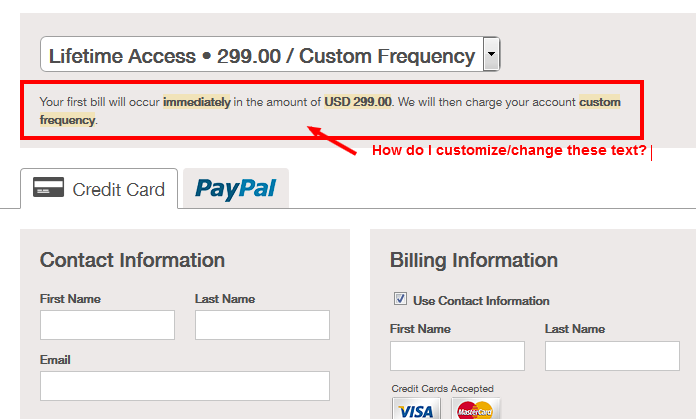
How do customize the text on the hosted checkout page: see this screenshot: http://i.imgur.com/Wz309oy.png

And why it says "Custom Frequency"?
-
 ScreenClip.png
28.3 KB
ScreenClip.png
28.3 KB

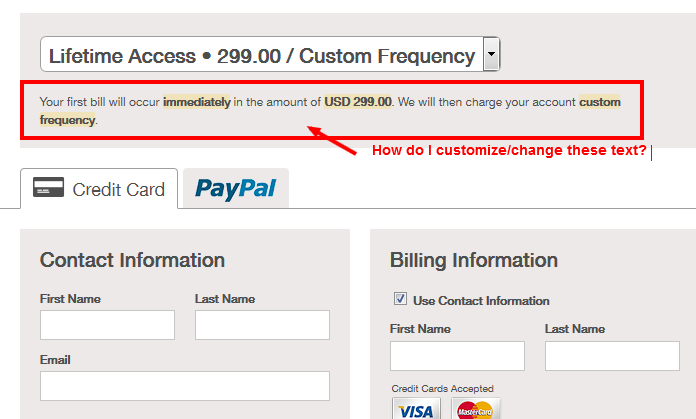
How do customize the text on the hosted checkout page: see this screenshot: http://i.imgur.com/Wz309oy.png
And why it says "Custom Frequency"?
 ScreenClip.png
28.3 KB
ScreenClip.png
28.3 KB
Discussions are closed to public comments.
If you need help with Cheddar please
start a new discussion.
| ? | Show this help |
|---|---|
| ESC | Blurs the current field |
| r | Focus the comment reply box |
|---|---|
| ^ + ↩ | Submit the comment |
You can use Command ⌘ instead of Control ^ on Mac
#1 Posted by Jess Pendley on 08 Jul, 2014 02:08 PM
Hi Jin --
You can read about customizing the appearance of your Hosted Page here.
As for the text displayed, that "Custom Frequency" text is reflective of your plan's configuration. Each plan will display it's billing frequency in that box by default. There's currently no way to customize the text in that field, however, you can hide that information by targeting the span class
.invoiceFrequency.In case this is an option that you'd like to pursue, you can enter the following text in the custom CSS box:
.invoiceFrequency { visibility: hidden; display: none;
}
If I can help you with anything else, please let me know.
Jess Pendley closed this discussion on 08 Jul, 2014 02:08 PM.
Jin Zhang re-opened this discussion on 09 Jul, 2014 09:37 AM
#2 Posted by Jin Zhang on 09 Jul, 2014 09:37 AM
Hi Jess,
Thanks for the reply.
I did try that, but it also removes the text that I do want to keep, such as “We will then charge your account monthly”, which needed to reaffirm customer.
But this sentence: “We will then charge your account custom frequency.” does not make any sense in English, and is confusing to customers.
It’s like saying to your family “I’ll be coming home for dinner at custom hour”.
Makes no sense.
Jin
#3 Posted by Jess Pendley on 09 Jul, 2014 01:11 PM
Hi Jin --
We completely understand, but as it stands there's no way to customize what shows in that text box. We are planning on adding that functionality, but as of now the best workaround for a situation like this would be to hide that text and then give a brief explanation of your billing frequency for your plans in the "About the Company" section of your Hosted Pages config.
You can fill that box with whatever text you'd like and it will show above the plan selection drop down.
#4 Posted by Jin Zhang on 09 Jul, 2014 01:18 PM
Ok, thanks.
But can you at least remove these two words: "custom frequency", which also show up in the dropdown choice.
Why the need to include two meaningless words at all?
#5 Posted by Jess Pendley on 09 Jul, 2014 01:19 PM
If you need anything else, please let me know.
Jess Pendley closed this discussion on 09 Jul, 2014 01:19 PM.
Marc Guyer re-opened this discussion on 10 Dec, 2014 04:35 PM
#6 Posted by Marc Guyer Support staff on 10 Dec, 2014 04:35 PM
See a workaround here:
http://support.cheddargetter.com/discussions/questions/12610-how-to...
Marc Guyer closed this discussion on 10 Dec, 2014 04:35 PM.